The characters
I started with photos of my daughters. An image model redrew each one as a cartoon robot assistant holding a tablet. The photos stay private; only the cartoons are on the site.
The first character became AIVA, the second SAIRA. Each one is a single 1024 px portrait. Everything else is made from that one picture.
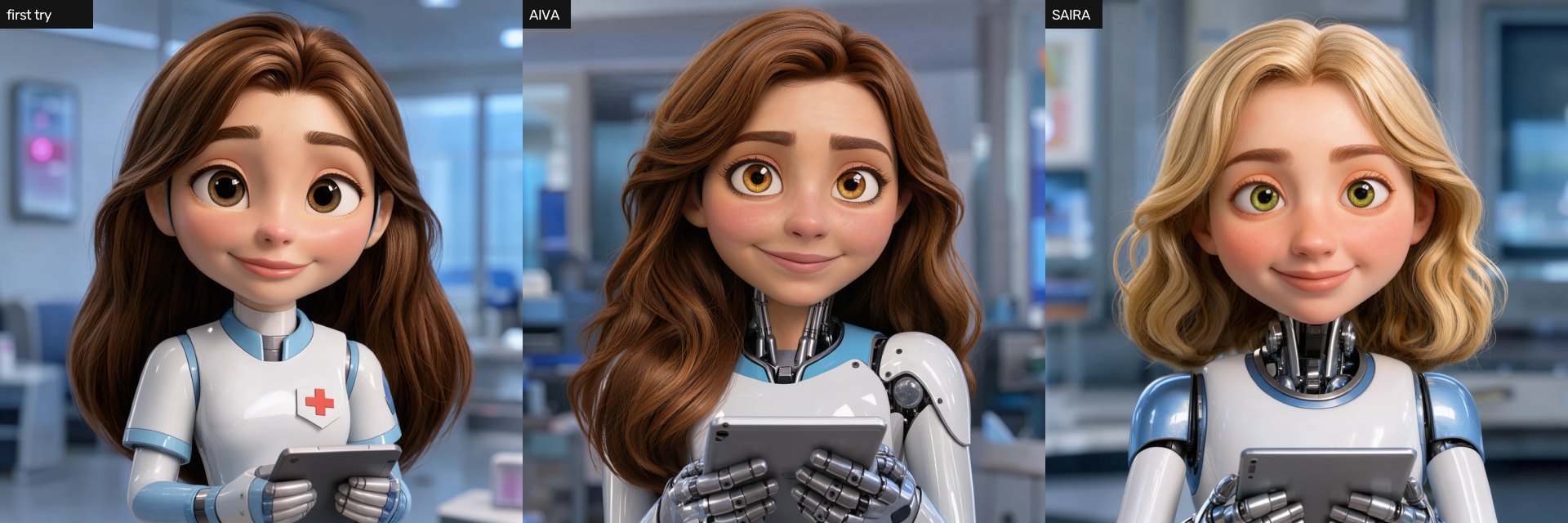
The work ran on the machine from my R9700 note: FLUX.3 Klein for image edits and LTX-2.5 for video, both in ComfyUI. Claude Code wrote the code and ran the models. I picked the takes and said what looked wrong.
First tries
Whole pictures. The first test asked Klein to redraw the full portrait with each mouth shape and a blink, then swapped pictures. It moved, but the mouths were too big and the face changed a little in every picture.
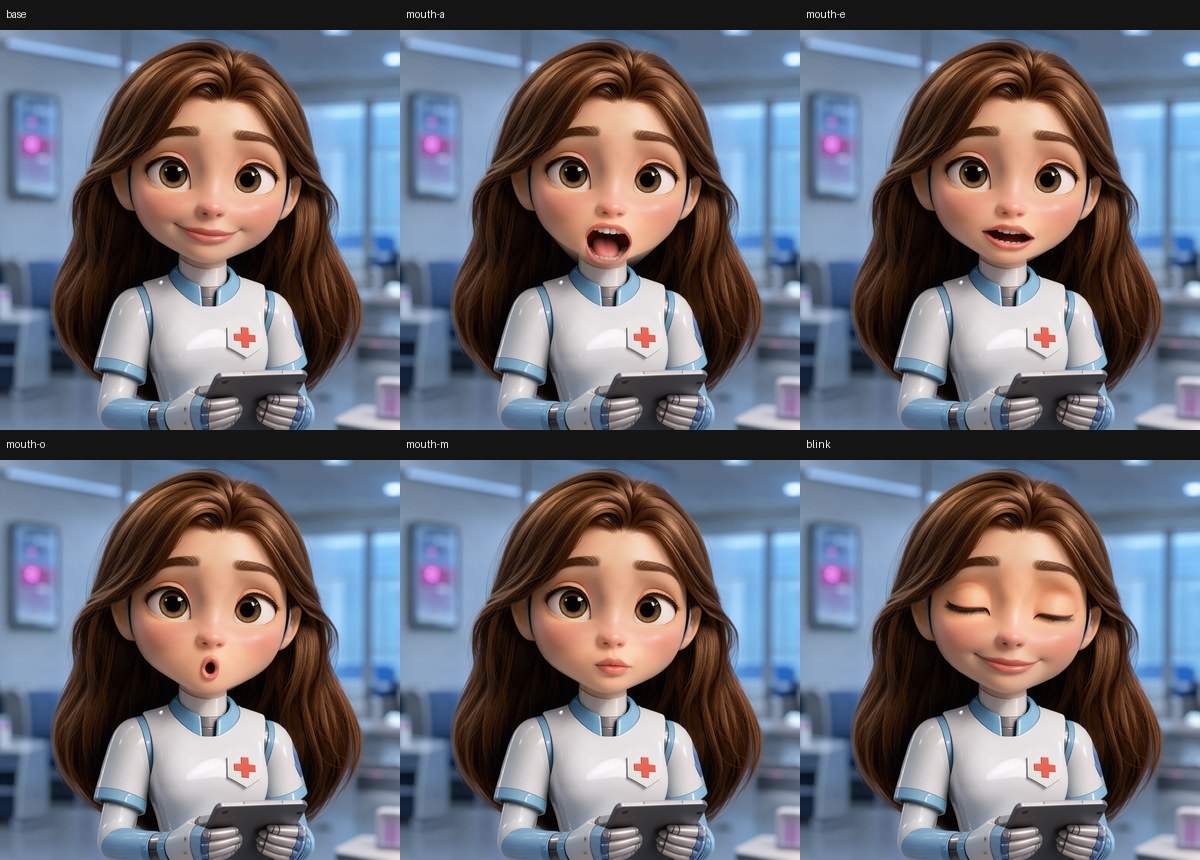
Video with a fixed speech. Next came short LTX clips for motion, with mouths pasted on in a finished video. It looked alive, but it could only say one recorded sentence: first lip-sync test (mp4).
Warping her own mouth. I also tried a shader that stretched the mouth in the clip. The chin got wider and narrower as she talked, so I dropped it.
What stayed: a real video clip for the body, and small mouth pictures placed on top in the browser.
Idle and thinking clips
LTX turns the portrait into a 5-second clip, 960 px square at 24 frames a second. One clip takes about three minutes to make. The portrait is pinned as the first and the last frame, so the clip ends where it began and can repeat.
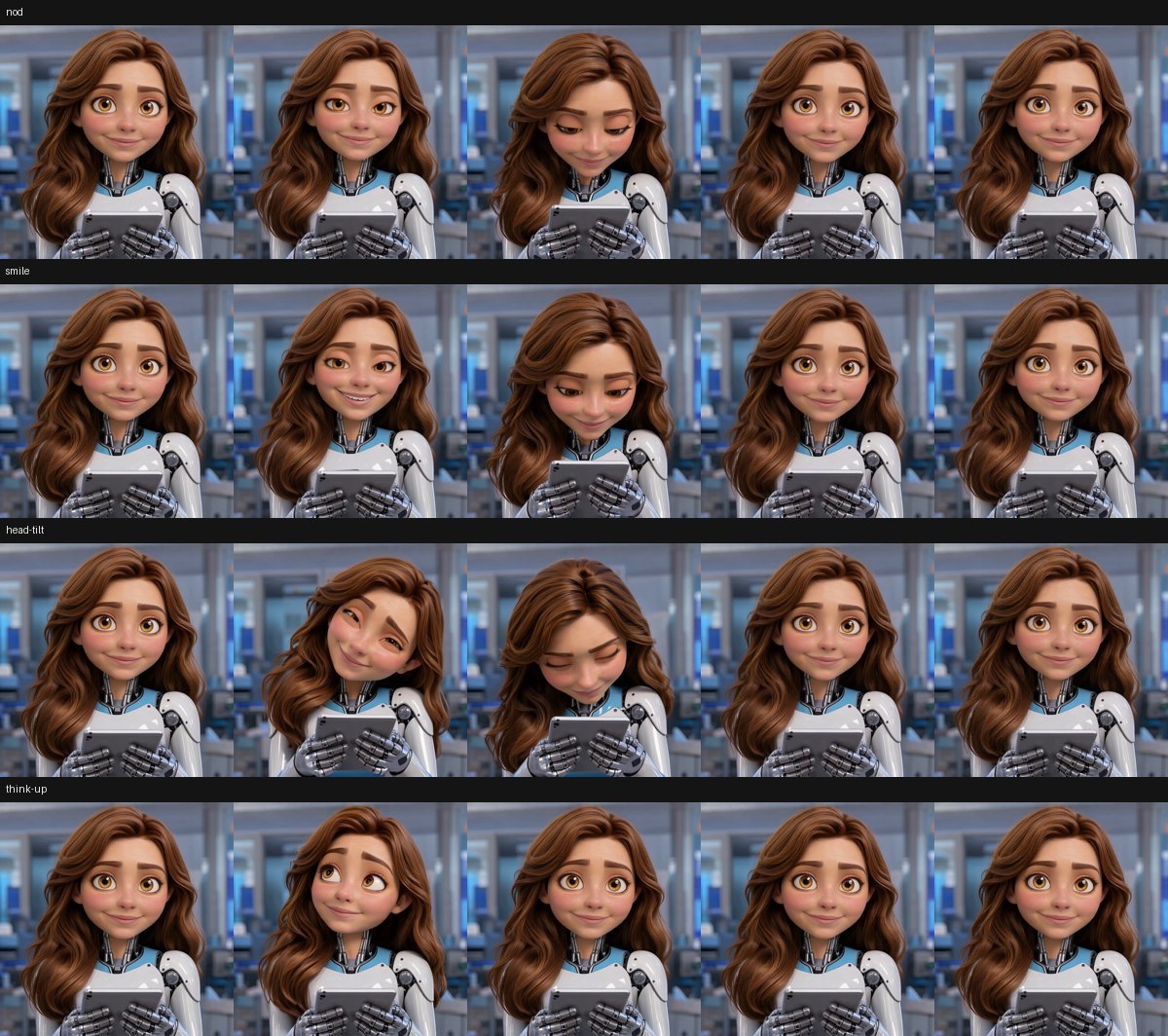
- Idle: small head moves, a nod or two, a blink. The page plays it forward, then backward, with frames blended in between. Clips: AIVA idle, SAIRA idle.
- Thinking: she looks down and reads her tablet. The page plays the way in, repeats the middle while the model works, then plays the way out. Clip: SAIRA reading.
Most takes fail. Some blink five times in five seconds. Some turn the head so far that the mouth can’t be followed. I tried 22 more takes to get AIVA to nod more, and none was usable: more nodding meant more turning. So I make a batch, score the takes, and keep one.
Mouth shapes
Klein edits the portrait once per mouth shape, and only the area around the mouth is kept. Five shapes plus the smile turned out to be enough:
| Shape | Used for |
|---|---|
| mm | m, b, p: lips closed |
| near | t, d, n, l, s, z, k, g and similar: lips almost closed |
| half | most vowels, and in-between frames |
| aa | stressed open vowels |
| oh | rounded sounds: o, oo, w |
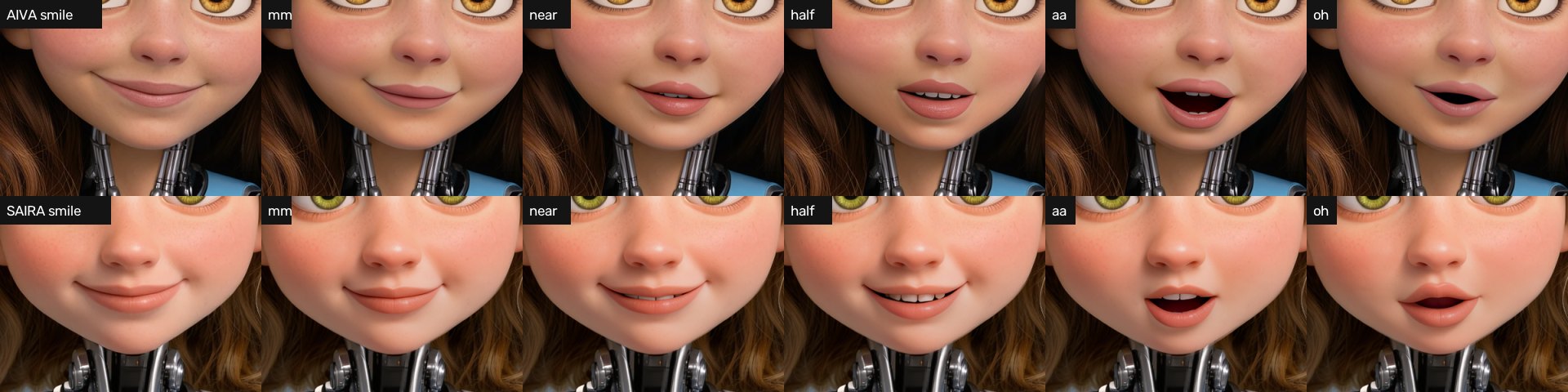
Klein needs several tries here too. For SAIRA I made 32 mouth pictures to get five. Her first “oh” shapes were wide black slits, the second batch looked like kisses, and the third prompt gave a normal oval.
A build script then prepares the data for the page:
- It follows the face through every frame of the clip, so it knows where the mouth is, how it is turned, and how the light on the skin changes.
- It cuts each mouth picture to a soft-edged patch.
- It marks blink and nod frames.
- It writes everything twice: 960 px for desktops and 640 px for phones.
The page
The page draws with WebGL. For every frame it draws the clip frame, then the mouth patch on her lips, moved and tinted to match that frame. When the shape changes, the skin around the mouth eases over three frames so it doesn’t pop.
Smaller touches:
- Nods in the clip are timed to land on the loudest stressed words.
- On strong accents a shader lifts her brows a few pixels.
- Long blinks are shortened.
- While thinking, her eyes move across the tablet as if reading.
Lip-sync rules
One mouth per sound looks wrong: the mouth flaps. The rules I ended up with come from animation practice and tools such as JALI and Rhubarb:
- Lips always close on m, b and p, for at least two frames.
- Other consonants bring the lips nearly closed, but only when they last long enough. Short ones take the shape of the vowel in the word.
- Only stressed vowels open wide.
- Rounded shapes start a little early and stay a little late.
- A jump from closed to wide open gets one in-between frame.
- In long pauses the mouth relaxes back to the smile.
The result is about four mouth changes a second. Same audio, before and after the rules: comparison (mp4).
Voice and answers
The voice is Piper with the Amy voice. It runs on the site’s small cloud server, on the CPU. The voice file is patched so Piper also reports how long every sound lasts. The page gets the audio and that list, and the mouth follows it exactly. No guessing from the sound wave.
One request goes like this:
- You type a question, or press Talk and speak. Speech becomes text in your browser.
- The page sends the text to the site’s server and starts the thinking clip.
- The server asks the language model at home for a short answer.
- Piper speaks the answer. The server returns the text, the audio and the sound timings.
- The page plays the audio and moves her mouth.
The model is told its name, to answer in one or two spoken sentences, and to use no lists or links. Conversations aren’t saved. The page sits behind a password and a rate limit, because every request uses my hardware.
Both demos below were recorded from the page: idle, thinking, then a spoken answer with sound. The answer is a fixed test sentence, not one from the model.
What runs where
Three places are involved: your browser, the site’s cloud server, and the PC at home.
| Where | What runs | Listens on |
|---|---|---|
| Browser | The page: the WebGL drawing, the lip-sync rules, audio playback, and speech-to-text for the Talk button | Nothing |
| Cloud server | nginx: serves the page and its pictures, checks the password and the rate limit | 443, public |
| Voice service: a small Python program with Piper. It speaks text and asks the model for answers | 127.0.0.1:8789 | |
| The server end of the SSH tunnel | 127.0.0.1:8790 | |
| Home PC | A gatekeeper in front of the model. It checks the API key, turns the model’s long thinking off, and starts the model if it isn’t loaded | port 8098 |
| The language model, on the GPU | Its own local port |
The page itself never touches ports 8790 or 8098. Your browser talks only to the website over HTTPS. It makes two kinds of request, both to the same address as the page:
POST /avatar/saywith a text. It gets back the audio and the timing of every sound.POST /avatar/chatwith the conversation so far and the character’s name. It gets back the answer as text, plus the audio and timings.
From there a question travels like this:
- Browser → nginx, port 443. nginx checks the password and the rate limit, then passes the request on.
- nginx → voice service, 127.0.0.1:8789. The service checks the length and its own limits: 600 characters, 10 requests a minute per visitor, 500 a day for the whole site.
- Voice service → 127.0.0.1:8790. This is the only thing that ever uses port 8790. The service sends a normal chat request, the same kind an OpenAI-style API takes, with the model’s API key.
- Port 8790 → the tunnel → port 8098 at home. SSH carries the request, encrypted, to the home PC and hands it to port 8098 there.
- Port 8098 → the model. The gatekeeper checks the key and asks the model. The answer goes back the same way.
- Voice service → browser. The service cleans the answer, has Piper speak it, and returns text, audio and timings in one reply.
So port 8790 is a door on the server that only the server’s own programs can reach, and port 8098 is where the model takes requests at home. The API key lives on the server and at home, never in the page. A visitor can’t send anything to the model except a short question through the voice service.
The model has no tools and there is no MCP here. It gets a short instruction and the conversation, and returns text. It can’t browse, run code or reach anything else on the home PC.
The voice service writes no questions or answers to its log, only counts and lengths.
The SSH tunnel
The website is on a small cloud server. The model is on a PC at home, behind my router. I didn’t want to open a port at home, so the home PC calls out instead. It keeps one SSH connection open to the server and asks for a reverse forward:
ssh -N -R 127.0.0.1:8790:127.0.0.1:8098 user@serverWith that, port 8790 on the server leads to port 8098 at home. The server end listens on localhost only, and the home PC only calls out, so nothing new faces the internet.
The key for this connection can do one thing. Its line in authorized_keys on the server:
restrict,port-forwarding,permitlisten="127.0.0.1:8790",command="/bin/false" ssh-ed25519 AAAA... avatar-tunnelNo shell, no other forwards. If the key leaked, all it could do is open that one port.
A systemd user service keeps the tunnel up:
[Service]
ExecStart=/usr/bin/ssh -N -i %h/.ssh/avatar_tunnel -o IdentitiesOnly=yes \
  -o ExitOnForwardFailure=yes -o ServerAliveInterval=30 -o ServerAliveCountMax=3 \
  -R 127.0.0.1:8790:127.0.0.1:8098 user@server
Restart=always
RestartSec=20ExitOnForwardFailuremakes SSH quit if the forward can’t be set up, so systemd retries.ServerAliveIntervalnotices a dead connection within about 90 seconds.
The model’s port also needs an API key, which only the server’s voice service has. When the home PC is off, busy or making video, the request fails and she says: “Sorry, I’m away from my desk right now.”
Adding SAIRA
The second character reused everything. From one portrait: 12 idle takes, 6 reading takes, 32 mouth pictures, one build. On the page a character is a folder of pictures and one line of code, and a switch picks who you talk to.
Two things broke, both because her face is rounder and her smile is deeper than AIVA’s:
- Shadows beside the mouth. The build copied soft skin shading from the smiling portrait onto every mouth patch. With SAIRA that painted smile creases next to an open mouth. Now each patch keeps its own skin.
- Steps on the cheek line. The patch was an oval wide enough to reach the edge of her face. When her head turned a little, the outline in the patch and the outline in the clip no longer met. Now the patch is cut to stay inside the face.
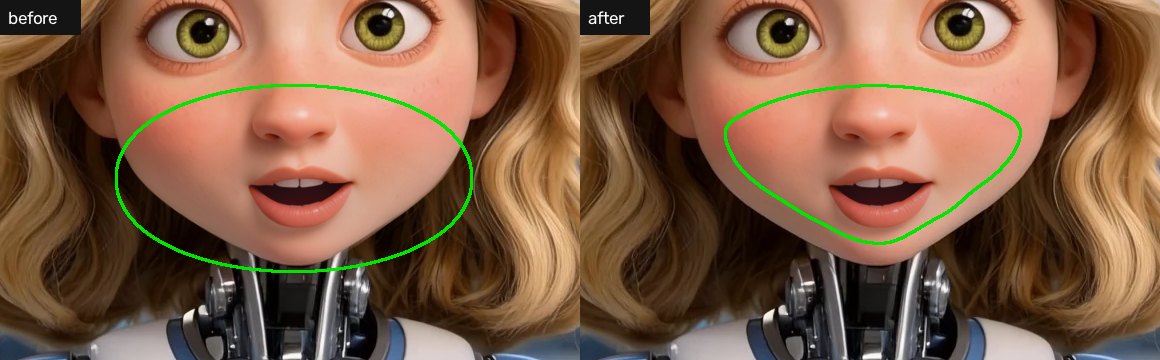
The voice also read her name wrong, so the server spells it “Sighra” for Piper.
Limits
- English only. The voice and the lip rules are for English.
- Front view only. The mouth can be followed only while she faces the camera, so the clips keep head turns small.
- Five mouths. No tongue, and no feelings in the mouth. She can’t look sad while talking.
- Lots of rejects. Most video takes and mouth pictures are thrown away. Picking is still done by eye.
- Home hardware. When the PC is off or making video, she is away.
- Behind a password. The live page isn’t public, which is why the demos are videos.